Teaching FM with Rithmatic

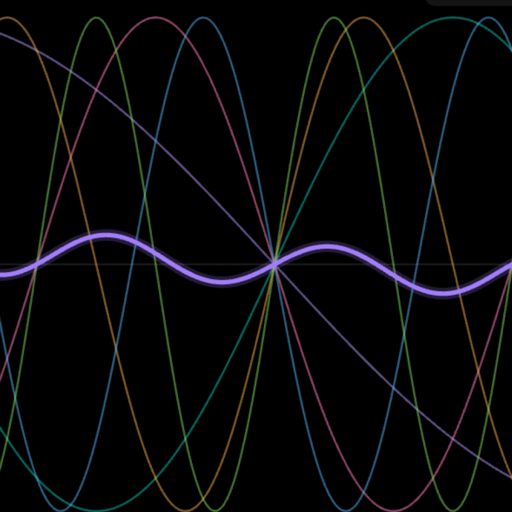
For teachers and students. Rithmatic draws FM as it happens: six operators wired as a graph you can touch, the sound's waveform moving as you play, and every DX7 parameter one tab away. Here are four short lessons to start a class from, and the DX7 names for every control.

Free on iPhone · iPad · Mac · Android No synth needed Offline, no accounts

Why It Works in a Classroom

  • Every student can have it. It is free on every platform, with nothing to buy, no ads and no accounts to set up.
  • Nothing to plug in. The built-in engine plays every patch; a MIDI keyboard or a DX7-family synth is optional.
  • It shows what FM is doing. The Patch Builder draws the algorithm as cables between operators, and the screen above it draws the waveform each operator makes.
  • 36,118 DX7 voices to take apart, the famous ones first under Essentials.
  • Everything can be undone, so students can experiment freely.

Before the First Class

  1. Have students install Rithmatic from the App Store or Google Play.
  2. If you teach from a DX7 manual or book, have them open Settings › Look › Control names and choose DX7. The Patch Builder then uses the DX7's own names (BREAK POINT, KEY VELOCITY SENS, EG 1–4). SIMPLIFIED, the default, uses plain words. Either way, the ⓘ beside each control explains it and gives its other name.
  3. A computer keyboard plays notes: A S D F G H J K are the white keys and W E T Y U the black ones.

Finding Your Way Around the Patch Builder

  • The canvas is the algorithm: each operator is a card with its LEVEL and its frequency ratio, and the cables show which operators modulate which. Carriers, the operators you hear, sit at the bottom.
  • The screen above it shows the sound. Click the sliders icon beside the patch name (“Edit the voice”) and the editing tabs come out: FEEL · ENVELOPE · OPERATOR · SCALING · LFO · PITCH. The operator a tab edits is chosen with the OP menu beside the tabs, or by selecting an operator on the canvas.
  • FROM SCRATCH (INIT VOICE with DX7 names) at the top of the tool column starts from the classic DX7 init voice: algorithm 1, OP1 alone as a sine.

Lesson 1: From One Sine Wave

  1. Press FROM SCRATCH and play. That is OP1 alone: a pure sine, with no harmonics.
  2. In algorithm 1, OP2 feeds OP1. Raise OP2's LEVEL slowly while holding a note. The sine fills with harmonics: that is frequency modulation. Higher level means a brighter sound.
  3. Change OP2's ratio from 1 to 2, then 3. Whole-number ratios stay musical; try 1.41 or 3.5 and the sound turns bell-like and inharmonic.
  4. Ask: what happens to the waveform on the screen at each step?

Lesson 2: Envelopes Shape the Timbre

  1. Keep the patch from lesson 1. Open the ENVELOPE tab and choose OP2.
  2. Drag the first handle right for a slow attack. Now the brightness swells in, as in a brass sound, while the volume (OP1's envelope) stays instant.
  3. Lower the third handle, the sustain level, so the brightness decays while the note is held: the start of a plucked or electric-piano sound.
  4. The four stages are ATTACK, DECAY 1, DECAY 2 and RELEASE: on a DX7, EG RATE and LEVEL 1–4.

Lesson 3: Keyboard Scaling

A patch that sounds right at middle C is often too harsh at the top of the keyboard and too dull at the bottom. Keyboard level scaling fixes that per operator, and rate scaling makes high notes decay sooner, as on a piano.

  1. Open the SCALING tab and choose a modulator, OP2.
  2. The graph is that operator's level on every key; the dotted line is where it would be with no scaling. The vertical line is the BREAK POINT.
  3. Drag the right side of the graph down. Play high notes: they are now darker. That is R DEPTH with a -LIN curve. Switch the curve to -EXP and the change starts gently and steepens further up.
  4. Drag the break point line to move the pivot, or type a note into its tile.
  5. Turn up RATE SCALING on the carrier and compare how long low and high notes ring.

Rithmatic names middle C C4, as most music software does. A DX7's screen calls the same key C3.

Lesson 4: Take a Classic Apart

  1. On Patches, press CHANGE PATCH › Essentials and pick a famous sound, such as an electric piano.
  2. Open the Patch Builder: the patch is on the canvas. Which operators are carriers? Which modulators are bright, and why?
  3. Turn operators off and on one at a time and listen to what each one adds. Look at the SCALING tab for each: most classic patches scale their modulators.
  4. Rebuild the sound from FROM SCRATCH, then compare.

Handing Work In

  • SAVE PATCH keeps a patch in the student's bank. From the bank, EXPORT .SYX saves standard DX7 files that any DX7 editor, Dexed or a real DX7 can open.
  • SHARE / IMPORT gives each patch a short code and a QR card. A student can send the code; you import it to hear exactly their patch.
  • Record in the header captures a performance as a WAV.

The Two Sets of Names

SimplifiedDX7Where
FROM SCRATCHINIT VOICETool column
FOLLOWS (KEY / FIXED)OSC MODE (RATIO / FIXED)OPERATOR
DETUNEOSC DETUNEOPERATOR
TOUCHKEY VELOCITY SENSOPERATOR
TREMOLOAMP MOD SENSOPERATOR
ATTACK · DECAY 1 · DECAY 2 · RELEASEEG 1 · 2 · 3 · 4ENVELOPE
PIVOT KEYBREAK POINTSCALING
LOW KEYS · HIGH KEYSL DEPTH · R DEPTHSCALING
LOW SHAPE · HIGH SHAPEL CURVE · R CURVESCALING
FALL · FALL LATE · RISE LATE · RISE-LIN · -EXP · +EXP · +LINSCALING
FASTER UP HIGHRATE SCALINGSCALING
VIBRATO · TREMOLOLFO PM DEPTH · LFO AM DEPTHLFO
VIBRATO RANGEPITCH MOD SENSLFO

Teaching with Rithmatic?

Write in. Rithmatic is made by one person, and requests from classrooms are exactly what shapes it: the SCALING tab and the DX7 names began with a teacher's email.

[email protected]

Enseñar FM con Rithmatic

Para docentes y estudiantes. Rithmatic dibuja la FM mientras sucede: seis operadores conectados en un gráfico que se puede tocar, la forma de onda del sonido moviéndose mientras se toca, y cada parámetro del DX7 a una pestaña de distancia. Aquí hay cuatro lecciones breves para empezar una clase, y los nombres DX7 de cada control.

Gratis en iPhone · iPad · Mac · Android Sin sintetizador Sin conexión, sin cuentas

Por Qué Funciona en el Aula

  • Todos los estudiantes pueden tenerla. Es gratuita en todas las plataformas, sin compras, sin anuncios y sin cuentas que crear.
  • No hay nada que conectar. El motor integrado toca cada patch; un teclado MIDI o un sintetizador de la familia DX7 es opcional.
  • Muestra lo que hace la FM. El Patch Builder dibuja el algoritmo como cables entre operadores, y la pantalla de arriba dibuja la forma de onda de cada operador.
  • 36.118 voces DX7 para desarmar, las más famosas primero en Essentials.
  • Todo se puede deshacer, así que los estudiantes pueden experimentar con libertad.

Antes de la Primera Clase

  1. Pida a los estudiantes que instalen Rithmatic desde el App Store o Google Play.
  2. Si enseña con un manual o un libro del DX7, pídales que abran Settings › Look › Control names y elijan DX7. El Patch Builder usará entonces los nombres del propio DX7 (BREAK POINT, KEY VELOCITY SENS, EG 1–4). SIMPLIFIED, la opción predeterminada, usa palabras sencillas (en inglés). En ambos casos, la ⓘ junto a cada control lo explica y da su otro nombre.
  3. El teclado del ordenador toca notas: A S D F G H J K son las teclas blancas y W E T Y U las negras.

Cómo Orientarse en el Patch Builder

  • El lienzo es el algoritmo: cada operador es una tarjeta con su LEVEL y su relación de frecuencia, y los cables muestran qué operador modula a cuál. Los portadores, los operadores que se oyen, están abajo.
  • La pantalla de arriba muestra el sonido. Pulse el icono de deslizadores junto al nombre del patch (“Edit the voice”) y aparecen las pestañas de edición: FEEL · ENVELOPE · OPERATOR · SCALING · LFO · PITCH. El operador que edita cada pestaña se elige con el menú OP junto a las pestañas, o seleccionando un operador en el lienzo.
  • FROM SCRATCH (INIT VOICE con los nombres DX7), arriba en la columna de herramientas, empieza desde la clásica voz inicial del DX7: algoritmo 1, OP1 solo, una onda senoidal.

Lección 1: Desde una Sola Senoidal

  1. Pulse FROM SCRATCH y toque. Es OP1 solo: una senoidal pura, sin armónicos.
  2. En el algoritmo 1, OP2 alimenta a OP1. Suba despacio el LEVEL de OP2 mientras mantiene una nota. La senoidal se llena de armónicos: eso es modulación de frecuencia. Más nivel, sonido más brillante.
  3. Cambie la relación de OP2 de 1 a 2, y luego a 3. Las relaciones enteras siguen siendo musicales; pruebe 1.41 o 3.5 y el sonido se vuelve de campana, inarmónico.
  4. Pregunte: ¿qué le pasa a la forma de onda en la pantalla en cada paso?

Lección 2: Las Envolventes Dan Forma al Timbre

  1. Mantenga el patch de la lección 1. Abra la pestaña ENVELOPE y elija OP2.
  2. Arrastre el primer punto a la derecha para un ataque lento. Ahora el brillo entra poco a poco, como en un sonido de metales, mientras el volumen (la envolvente de OP1) sigue siendo inmediato.
  3. Baje el tercer punto, el nivel de sostenido, para que el brillo decaiga mientras se mantiene la nota: el comienzo de un sonido pulsado o de piano eléctrico.
  4. Las cuatro etapas son ATTACK, DECAY 1, DECAY 2 y RELEASE: en un DX7, EG RATE y LEVEL 1–4.

Lección 3: Escalado de Teclado

Un patch que suena bien en el Do central suele ser demasiado áspero en la parte alta del teclado y demasiado apagado en la baja. El escalado de nivel por teclado lo corrige en cada operador, y el escalado de rate hace que las notas agudas decaigan antes, como en un piano.

  1. Abra la pestaña SCALING y elija un modulador, OP2.
  2. El gráfico es el nivel de ese operador en cada tecla; la línea de puntos es dónde estaría sin escalado. La línea vertical es el BREAK POINT.
  3. Arrastre hacia abajo el lado derecho del gráfico. Toque notas agudas: ahora son más oscuras. Eso es R DEPTH con una curva -LIN. Cambie la curva a -EXP y el cambio empieza suave y se acentúa más arriba.
  4. Arrastre la línea del break point para mover el pivote, o escriba una nota en su casilla.
  5. Suba el RATE SCALING del portador y compare cuánto suenan las notas graves y las agudas.

Rithmatic llama C4 al Do central, como la mayoría del software musical. La pantalla de un DX7 llama a la misma tecla C3.

Lección 4: Desarmar un Clásico

  1. En Patches, pulse CHANGE PATCH › Essentials y elija un sonido famoso, como un piano eléctrico.
  2. Abra el Patch Builder: el patch está en el lienzo. ¿Qué operadores son portadores? ¿Qué moduladores son brillantes, y por qué?
  3. Apague y encienda los operadores uno por uno y escuche lo que aporta cada uno. Mire la pestaña SCALING de cada uno: la mayoría de los patches clásicos escalan sus moduladores.
  4. Reconstruya el sonido desde FROM SCRATCH y compare.

Entregar los Trabajos

  • SAVE PATCH guarda un patch en el banco del estudiante. Desde el banco, EXPORT .SYX guarda archivos DX7 estándar que cualquier editor DX7, Dexed o un DX7 real pueden abrir.
  • SHARE / IMPORT da a cada patch un código corto y una tarjeta QR. El estudiante puede enviar el código; usted lo importa y oye exactamente su patch.
  • Record en la cabecera graba una interpretación como WAV.

Los Dos Juegos de Nombres

SimplifiedDX7Dónde
FROM SCRATCHINIT VOICEColumna de herramientas
FOLLOWS (KEY / FIXED)OSC MODE (RATIO / FIXED)OPERATOR
DETUNEOSC DETUNEOPERATOR
TOUCHKEY VELOCITY SENSOPERATOR
TREMOLOAMP MOD SENSOPERATOR
ATTACK · DECAY 1 · DECAY 2 · RELEASEEG 1 · 2 · 3 · 4ENVELOPE
PIVOT KEYBREAK POINTSCALING
LOW KEYS · HIGH KEYSL DEPTH · R DEPTHSCALING
LOW SHAPE · HIGH SHAPEL CURVE · R CURVESCALING
FALL · FALL LATE · RISE LATE · RISE-LIN · -EXP · +EXP · +LINSCALING
FASTER UP HIGHRATE SCALINGSCALING
VIBRATO · TREMOLOLFO PM DEPTH · LFO AM DEPTHLFO
VIBRATO RANGEPITCH MOD SENSLFO

¿Enseña con Rithmatic?

Escríbanos. Rithmatic lo hace una sola persona, y las peticiones que llegan desde las aulas son justo lo que le da forma: la pestaña SCALING y los nombres DX7 empezaron con el correo de un docente.

[email protected]

FM unterrichten mit Rithmatic

Für Lehrende und Lernende. Rithmatic zeigt FM, während sie passiert: sechs Operatoren als Graph, den du anfassen kannst, die Wellenform des Klangs in Bewegung, während du spielst, und jeder DX7-Parameter einen Tab entfernt. Hier sind vier kurze Lektionen für den Einstieg in eine Stunde und die DX7-Namen für jedes Bedienelement.

Kostenlos für iPhone · iPad · Mac · Android Kein Synthesizer nötig Offline, ohne Accounts

Warum es im Unterricht funktioniert

  • Alle können es haben. Kostenlos auf jeder Plattform, ohne Käufe, Werbung oder Accounts.
  • Nichts anzuschließen. Die eingebaute Engine spielt jeden Patch; ein MIDI-Keyboard oder ein Synth der DX7-Familie ist optional.
  • Es zeigt, was FM tut. Der Patch Builder zeichnet den Algorithmus als Kabel zwischen Operatoren, und der Bildschirm darüber die Wellenform jedes Operators.
  • 36.118 DX7-Klänge zum Zerlegen, die berühmtesten zuerst unter Essentials.
  • Alles lässt sich rückgängig machen, also kann man frei ausprobieren.

Vor der ersten Stunde

  1. Lass alle Rithmatic aus dem App Store oder von Google Play installieren.
  2. Wenn du mit einem DX7-Handbuch oder -Buch unterrichtest: Settings › Look › Control names auf DX7 stellen. Der Patch Builder verwendet dann die Namen des DX7 selbst (BREAK POINT, KEY VELOCITY SENS, EG 1–4). SIMPLIFIED, die Voreinstellung, verwendet einfache (englische) Wörter. So oder so erklärt das ⓘ neben jedem Bedienelement, was es tut, und nennt den anderen Namen.
  3. Die Computertastatur spielt Noten: A S D F G H J K sind die weißen Tasten, W E T Y U die schwarzen.

Orientierung im Patch Builder

  • Die Arbeitsfläche ist der Algorithmus: Jeder Operator ist eine Karte mit seinem LEVEL und seinem Frequenzverhältnis, und die Kabel zeigen, welcher Operator welchen moduliert. Die Träger, die Operatoren, die man hört, liegen unten.
  • Der Bildschirm darüber zeigt den Klang. Tippe auf das Regler-Symbol neben dem Patch-Namen („Edit the voice“), dann erscheinen die Tabs: FEEL · ENVELOPE · OPERATOR · SCALING · LFO · PITCH. Welchen Operator ein Tab bearbeitet, wählst du im OP-Menü daneben oder durch Antippen eines Operators auf der Fläche.
  • FROM SCRATCH (INIT VOICE mit DX7-Namen) oben in der Werkzeugspalte startet von der klassischen DX7-Init-Voice: Algorithmus 1, nur OP1, eine Sinuswelle.

Lektion 1: Von einer Sinuswelle aus

  1. Tippe auf FROM SCRATCH und spiel. Das ist OP1 allein: ein reiner Sinus ohne Obertöne.
  2. In Algorithmus 1 speist OP2 den OP1. Erhöhe langsam OP2s LEVEL, während du eine Note hältst. Der Sinus füllt sich mit Obertönen: Das ist Frequenzmodulation. Mehr Level heißt heller.
  3. Ändere OP2s Verhältnis von 1 auf 2, dann auf 3. Ganzzahlige Verhältnisse bleiben musikalisch; probier 1.41 oder 3.5, und es klingt glockig und unharmonisch.
  4. Frage: Was passiert bei jedem Schritt mit der Wellenform auf dem Bildschirm?

Lektion 2: Hüllkurven formen die Klangfarbe

  1. Behalte den Patch aus Lektion 1. Öffne den Tab ENVELOPE und wähle OP2.
  2. Zieh den ersten Punkt nach rechts für einen langsamen Attack. Jetzt schwillt die Helligkeit an wie bei Blech, während die Lautstärke (OP1s Hüllkurve) sofort da ist.
  3. Senke den dritten Punkt, den Sustain-Level, damit die Helligkeit abklingt, während die Note gehalten wird: der Anfang eines gezupften oder E-Piano-Klangs.
  4. Die vier Stufen heißen ATTACK, DECAY 1, DECAY 2 und RELEASE: auf einem DX7 EG RATE und LEVEL 1–4.

Lektion 3: Keyboard Scaling

Ein Patch, der beim mittleren C gut klingt, ist oben oft zu scharf und unten zu dumpf. Keyboard Level Scaling korrigiert das pro Operator, und Rate Scaling lässt hohe Töne früher ausklingen, wie bei einem Klavier.

  1. Öffne den Tab SCALING und wähle einen Modulator, OP2.
  2. Der Graph ist der Pegel dieses Operators auf jeder Taste; die gepunktete Linie zeigt, wo er ohne Scaling läge. Die senkrechte Linie ist der BREAK POINT.
  3. Zieh die rechte Seite des Graphen nach unten. Spiel hohe Töne: Sie sind jetzt dunkler. Das ist R DEPTH mit einer -LIN-Kurve. Stell die Kurve auf -EXP, und die Änderung beginnt sanft und wird weiter oben steiler.
  4. Zieh die Break-Point-Linie, um den Drehpunkt zu verschieben, oder tippe eine Note in seine Kachel.
  5. Dreh beim Träger RATE SCALING auf und vergleiche, wie lange tiefe und hohe Töne klingen.

Rithmatic nennt das mittlere C C4, wie die meiste Musiksoftware. Das Display eines DX7 nennt dieselbe Taste C3.

Lektion 4: Einen Klassiker zerlegen

  1. Tippe unter Patches auf CHANGE PATCH › Essentials und wähle einen berühmten Klang, etwa ein E-Piano.
  2. Öffne den Patch Builder: Der Patch liegt auf der Fläche. Welche Operatoren sind Träger? Welche Modulatoren sind hell, und warum?
  3. Schalte die Operatoren einzeln aus und wieder ein und hör, was jeder beiträgt. Sieh dir bei jedem den SCALING-Tab an: Die meisten klassischen Patches skalieren ihre Modulatoren.
  4. Bau den Klang ab FROM SCRATCH nach und vergleiche.

Arbeiten abgeben

  • SAVE PATCH legt einen Patch in die eigene Bank. Aus der Bank speichert EXPORT .SYX Standard-DX7-Dateien, die jeder DX7-Editor, Dexed oder ein echter DX7 öffnen kann.
  • SHARE / IMPORT gibt jedem Patch einen kurzen Code und eine QR-Karte. Wer den Code schickt, schickt genau diesen Patch.
  • Record in der Kopfzeile nimmt ein Spiel als WAV auf.

Die beiden Namenssätze

SimplifiedDX7Wo
FROM SCRATCHINIT VOICEWerkzeugspalte
FOLLOWS (KEY / FIXED)OSC MODE (RATIO / FIXED)OPERATOR
DETUNEOSC DETUNEOPERATOR
TOUCHKEY VELOCITY SENSOPERATOR
TREMOLOAMP MOD SENSOPERATOR
ATTACK · DECAY 1 · DECAY 2 · RELEASEEG 1 · 2 · 3 · 4ENVELOPE
PIVOT KEYBREAK POINTSCALING
LOW KEYS · HIGH KEYSL DEPTH · R DEPTHSCALING
LOW SHAPE · HIGH SHAPEL CURVE · R CURVESCALING
FALL · FALL LATE · RISE LATE · RISE-LIN · -EXP · +EXP · +LINSCALING
FASTER UP HIGHRATE SCALINGSCALING
VIBRATO · TREMOLOLFO PM DEPTH · LFO AM DEPTHLFO
VIBRATO RANGEPITCH MOD SENSLFO

Du unterrichtest mit Rithmatic?

Schreib uns. Rithmatic wird von einer einzigen Person entwickelt, und Wünsche aus dem Unterricht formen es: Der SCALING-Tab und die DX7-Namen begannen mit der E-Mail einer Lehrkraft.

[email protected]